You just ordered a pizza through Domino's app. You didn't call anyone. You didn't walk into the store. You just tapped a few buttons, and somehow the kitchen got your order, your address, and your payment—all in seconds.
Or think about this: You're booking a flight on Kayak. One search shows you prices from Delta, United, Southwest, and 20 other airlines instantly. How does Kayak have access to all those airline systems?
The answer isn't magic. It's APIs.
And if you've ever wondered how apps talk to each other, how your Uber app knows where you are, or how Instagram loads photos from the cloud—you're about to find out.

What Is an API, Really?
API stands for Application Programming Interface. But forget the jargon.
Think of an API as a waiter in a restaurant. You (the customer) don't go into the kitchen and cook your own meal. You tell the waiter what you want. The waiter takes your order to the kitchen, the kitchen prepares it, and the waiter brings it back to you.
An API does the same thing between apps. It takes your request, delivers it to a system that has what you need, and brings back the result—all without you seeing what happens behind the scenes.
How APIs Actually Work: Step by Step
Step 1: You Make a Request
Every time you interact with an app, you're making requests—even if you don't realize it.
Open Instagram? Your app requests: "Show me the latest posts from people I follow."
Check the weather? Your app requests: "What's the temperature in New York right now?"
Pay with Google Pay? Your app requests: "Process this $50 payment."
Real-life example: You open Spotify and search for "Coldplay." You just made a request. You're asking Spotify's system: "Do you have songs by Coldplay? Send them to me."
The API is the messenger that carries this request from your phone to Spotify's servers.

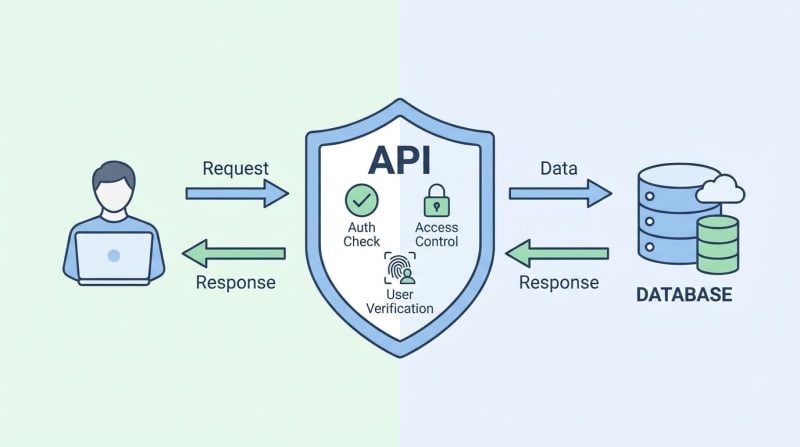
Step 2: The API Delivers Your Request to the Right Place
Your request doesn't go directly to Spotify's music database. That would be chaos—millions of people making requests at once, all trying to access the same system.
Instead, the API acts as a gatekeeper and translator.
It takes your request, checks if it's valid (Are you logged in? Do you have permission?), formats it properly, and delivers it to the right part of Spotify's system.
Analogy time: Imagine you're at a hotel front desk. You don't walk into the back office and search through filing cabinets yourself. You ask the receptionist, who has organized access to everything. The receptionist knows exactly where to look and brings you what you need.
That receptionist? That's the API.
Step 3: The System Processes Your Request
Now the real work happens behind the scenes.
Spotify's server receives your request: "Songs by Coldplay, please."
The system searches its massive music library, finds every Coldplay track, checks which ones you have access to (based on your subscription), and packages the results.
This all happens in milliseconds. You don't see loading screens because the API is designed for speed.
Here's what's actually happening:
Database query: "SELECT * FROM songs WHERE artist = 'Coldplay'"
Permission check: "Does this user have Premium or Free?"
Data packaging: "Send back song titles, album art, and play links"
The API handles all this complexity so you just see a clean list of songs.
Step 4: The API Sends Back a Response
Once the system has your data ready, the API delivers it back to your app.
This response is usually in a format called JSON (JavaScript Object Notation)—basically a structured list that apps can easily read.
Example response (simplified):

Your Spotify app receives this data and displays it beautifully on your screen. You see album covers, play buttons, and lyrics—all because the API delivered the raw data your app needed.

Step 5: Your App Displays the Result
This is the part you actually see.
Your screen refreshes. Songs appear. Album art loads. The play button is ready.
But remember: your app didn't create this content. It just displayed what the API brought back.
This is why apps can be lightweight and fast. They don't store millions of songs or maps or restaurant listings. They just know how to ask APIs for what they need, exactly when they need it.
Real-world comparison: Your TV remote doesn't contain every TV show ever made. It just knows how to tell Netflix's API: "Play Stranger Things, Season 4, Episode 1." Netflix does the heavy lifting.
Real-Life Example: Ordering an Uber
Let's break down what happens when you request a ride:
Step 1: You open the Uber app
The app requests: "Where is this user located?"
Google Maps API responds with your GPS coordinates.
Step 2: You enter your destination
The app requests: "What's the best route from Point A to Point B?"
Google Maps API calculates routes and sends back options.
Step 3: You see available drivers
The app requests: "Which drivers are nearby and available?"
Uber's API queries driver locations in real-time and sends back the closest matches.
Step 4: You confirm the ride
The app requests: "Book Driver #12345 for this trip."
Uber's API assigns the driver, notifies them, and confirms your booking.
Step 5: You pay
The app requests: "Charge $15.50 to this credit card."
Payment API (Stripe, PayPal, etc.) processes the transaction and confirms payment.
The result? You just used at least 3 different APIs (Google Maps, Uber's own system, and a payment processor) in a single 30-second interaction.
And you never knew they were there.

Why the API System Works So Well
✅ Speed - APIs are optimized to respond in milliseconds, even with millions of requests
✅ Specialization - Each service does one thing perfectly (Google does maps, Stripe does payments)
✅ Scalability - One API can serve millions of apps and billions of users simultaneously
✅ Security - APIs control what data you can access (you can't see other users' orders or passwords)
✅ Simplicity for developers - Instead of building everything from scratch, developers connect existing APIs like LEGO blocks
✅ Real-time updates - APIs pull fresh data every time you make a request (live scores, stock prices, weather)
✅ Interoperability - Different apps and platforms can work together seamlessly (share a YouTube video on Twitter, post Instagram to Facebook)
How to Actually Use APIs (Actionable Tips)
For Everyday Users:
When an app asks for permissions (location, contacts, photos), it's planning to use APIs to access that data—be selective
Use apps that integrate well with others (Google Calendar syncing with Zoom, Spotify connecting to Instagram Stories)
Understand that when you "log in with Google/Facebook," those companies are providing your info via API—read what data you're sharing
For Aspiring Developers:
Start with simple, free APIs: OpenWeather (weather data), REST Countries (country info), Dog API (random dog photos—seriously)
Use tools like Postman to test API requests without writing code first
Read API documentation—every good API has a guide explaining exactly how to ask for data
Practice with JSON—learn to read and write this data format
Start with GET requests (reading data) before POST/PUT/DELETE (writing/updating data)
For Business Owners:
Most modern software runs on APIs—ask developers which third-party services they're integrating
API costs can add up (Google Maps charges per request after free tier)—budget accordingly
APIs can break or change—always have a backup plan if a critical API goes down
For the Tech-Curious: What Happens Under the Hood
REST APIs (Most Common):
REST (Representational State Transfer) is an architectural style for APIs. When you make a request, you're using HTTP methods:
GET - Retrieve data ("Show me posts")
POST - Send new data ("Upload this photo")
PUT - Update data ("Change my username")
DELETE - Remove data ("Delete this comment")
Endpoints:
Every API has specific URLs (called endpoints) for different functions:
api.spotify.com/v1/search- Search for music
api.spotify.com/v1/me/playlists - Get your playlists
api.spotify.com/v1/tracks/play - Play a specific song
Authentication:
Most APIs require an API key (like a password) or OAuth token (permission slip) so they know who's asking for data. This prevents abuse and tracks usage.
Rate Limiting:
To prevent overload, APIs limit how many requests you can make:
Twitter API: 300 requests per 15 minutes
Google Maps API: 25,000 requests per day (free tier)
Exceed the limit, and you'll get blocked temporarily.
Webhooks (Reverse APIs):
Instead of you constantly asking "Is there new data?", webhooks let the API notify your app when something happens. Think of it like a doorbell instead of constantly checking if someone's at the door.
The Bottom Line
Every app you use is powered by APIs. They're the invisible glue connecting the digital world.
When you order food, book a trip, check your bank balance, or share a meme, APIs are working silently in the background—requesting data, verifying permissions, processing payments, and delivering results in the blink of an eye.
You don't need to build everything from scratch. You just need to know how to ask.
That's the power of APIs.