Hey cricket fans! Imagine this: It's the IPL final. Rohit Sharma smashes a massive six in the last over. The crowd in the stadium is roaring like crazy. And you're on your couch, phone in hand, watching it happen LIVE – no lag, no pixelated mess, even if your internet is playing hide-and-seek. How does that happen for millions of us at the exact same second?
It's not magic. It's a super-smart live streaming system built like a well-oiled cricket machine. I'll walk you through it step by step in plain English, like I'm explaining it to my friend who just started watching IPL. We'll use real-life examples from actual matches, plus actionable tips you can use tonight while watching the next game. No boring textbook stuff – just the cool behind-the-scenes that makes your viewing experience addictive.
1. The Action Starts in the Stadium: Cameras Everywhere
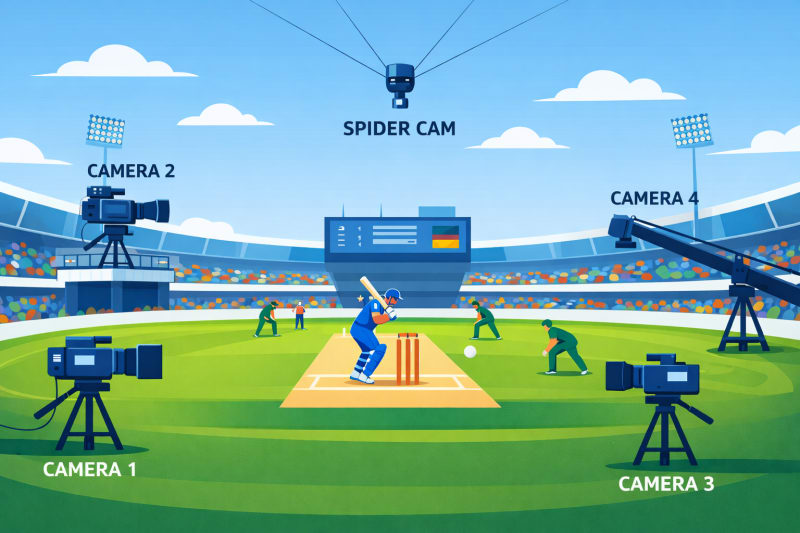
Picture the stadium on match day. It's not one guy with a phone filming. There are 20-30 pro cameras mounted all around – some high up for the big picture, some zooming in on the bowler's run-up, others tracking the ball like a hawk. These cameras feed raw, super-high-quality video straight to a broadcast truck parked outside the ground.
Real-life example: Remember that epic catch in the 2024 IPL where a fielder dived full stretch? Multiple cameras caught it from different angles, so the director picks the best one instantly. Without this, you'd just see a blurry phone video like on social media.
Actionable tip: Next match, try switching camera angles in the app (JioHotstar lets you do this). You'll see how the system juggles feeds in real time – it feels like you're the director!
2. Turning Raw Video into Multiple "Versions": Encoding Magic
The raw video from the stadium is massive – like trying to send a 4K movie file every second. So engineers quickly "encode" it. This means they compress and create several versions at once: super sharp 4K or HD for fast internet, medium quality for normal 4G, and low quality (like 480p) for slow connections. It's all happening in powerful servers near the stadium or in big data centers.
Real-life example: During the 2025 IPL opener, my friend in a village with shaky 4G still saw every wicket clearly because the system auto-picked the lighter version. His cousin in Mumbai with fiber watched in crystal-clear HD – same match, different qualities, zero complaints.
Actionable tip: If you're on mobile data, turn on "Data Saver" in the app settings before the match. It tells the system upfront to start with lighter chunks so you don't burn through your quota in the first over.

3. Chopping the Match into Tiny Bites: Small Chunks Rule
You can't send the entire 3-hour match in one go – that would take forever and crash everything. Instead, the encoded video is split into super-small chunks, usually 2 to 10 seconds each. Each chunk is a tiny self-contained piece of the match: "Chunk 1: Kohli faces the ball", "Chunk 2: The boundary is hit", and so on. These chunks are numbered and ready to ship instantly.
Real-life example: When that last-ball thriller happened in Chennai last season, the "six" moment was in one 5-second chunk that flew to your phone while the next chunk (celebrations) was still being made. You saw it almost live, not waiting for the full innings.
Actionable tip: If you ever notice a tiny delay (like 5-8 seconds behind the stadium), that's normal – it's the price for smooth chunks instead of constant buffering. Pause for 3 seconds and resume; the player catches up fast.

4. Super-Fast Delivery to Millions: The CDN Network
Now the chunks need to reach you – and 10-20 million other fans at the same time. Enter the CDN (Content Delivery Network). Think of it as a team of thousands of local "delivery boys" spread across India. The chunks are copied to servers in cities near you (Mumbai, Delhi, Bangalore, Hyderabad, even smaller towns). Your phone grabs the chunk from the closest server, not all the way from the stadium.
Real-life example: In the 2025 playoffs, when JioHotstar streamed for free to record-breaking crowds, the CDN handled the load so well that even people in remote Rajasthan didn't face lag. Without it, everyone would be stuck buffering like old YouTube videos.
Actionable tip: Use Wi-Fi over mobile data when possible, and pick the app's "Auto" quality. It knows which CDN server is fastest for your location – saves battery and data.

5. Your Phone's Smart Player: Adaptive Streaming in Action
This is the part you see. The video player in the IPL app (like JioHotstar ) is super intelligent. It keeps fetching the next chunk while you're watching the current one. Every few seconds, it checks your internet speed. Slowing down? It grabs a lower-quality chunk automatically. Speed back up? Boom – it switches to HD without you noticing. This is called adaptive streaming, and it keeps everything smooth with almost zero lag (usually under 10 seconds behind live action).
Real-life example: Last IPL, I was watching on a train from Delhi to Agra. Network dipped in tunnels – the player dropped to lower quality for 20 seconds, then jumped back to full HD when signal returned. I didn't miss a single moment of the chase. My roommate on the same train with older app kept buffering – the difference was huge!
Actionable tips for buttery-smooth viewing:
Close all background apps before the match starts – frees up bandwidth.
If it buffers once, tap the quality icon and lock it to "Medium" manually for the rest of the game.
Use headphones or Chromecast to your TV – the player works even better on bigger screens.
Pro fan hack: Watch the first 5 minutes in low quality to let the system "warm up" the connection, then let it auto-boost.

Why This Whole System Feels Like Real Magic (And Why It Matters)
Put it all together: Stadium cameras → encode multiple qualities → chop into chunks → CDN blasts them nearby → your player grabs and adapts in real time. The result? Millions watch the same six at nearly the same second, no crashes, no frustration. It's why IPL viewership hits records every year – tech makes cricket accessible to everyone, from metro cities to villages.
Bonus useful tip: If you're a student or on limited data, download the match highlights later instead of live. But for live, this system is so good you barely use 1-2 GB for a full match in auto mode.
Next time the IPL is on, you'll watch with new eyes. You'll know exactly why that six felt instant and why your stream didn't die when your roommate started Netflix. It's engineering love for the game.